
Distance Tier Pricing
Charge accurately with tiered pricing based on distance for your taxi booking system.
Overview
Distance Tier Pricing lets you charge a different price per kilometer (or mile) for different parts of a trip. For example, a cheaper rate on long trips, or a higher rate in the first few kilometers. You set the distance ranges and the rate for each range on every vehicle. The booking form then prices each trip automatically, and the vehicle card shows which tier the trip fell into.
Requirements
- eCab Taxi Booking Manager, active.
- A vehicle that uses distance-based pricing (Distance or Distance + Duration in the vehicle’s Pricing step), booked through the distance booking form (
[mptbm_booking]).
Installation
- Download the add-on zip from your MagePeople account.
- Go to Plugins → Add New → Upload Plugin.
- Upload the zip file and click Install Now.
- Click Activate. If eCab is not active, WordPress shows a notice that it is required.
- To receive updates, enter your license key in the Distance Based Tier Pricing Addon row under Transportation → Settings → Mage-People License.
Usage
Tiers are set per vehicle, so each vehicle can have its own rates.
- Go to Transportation → All Transport and edit a vehicle.
- Open the Pricing step.
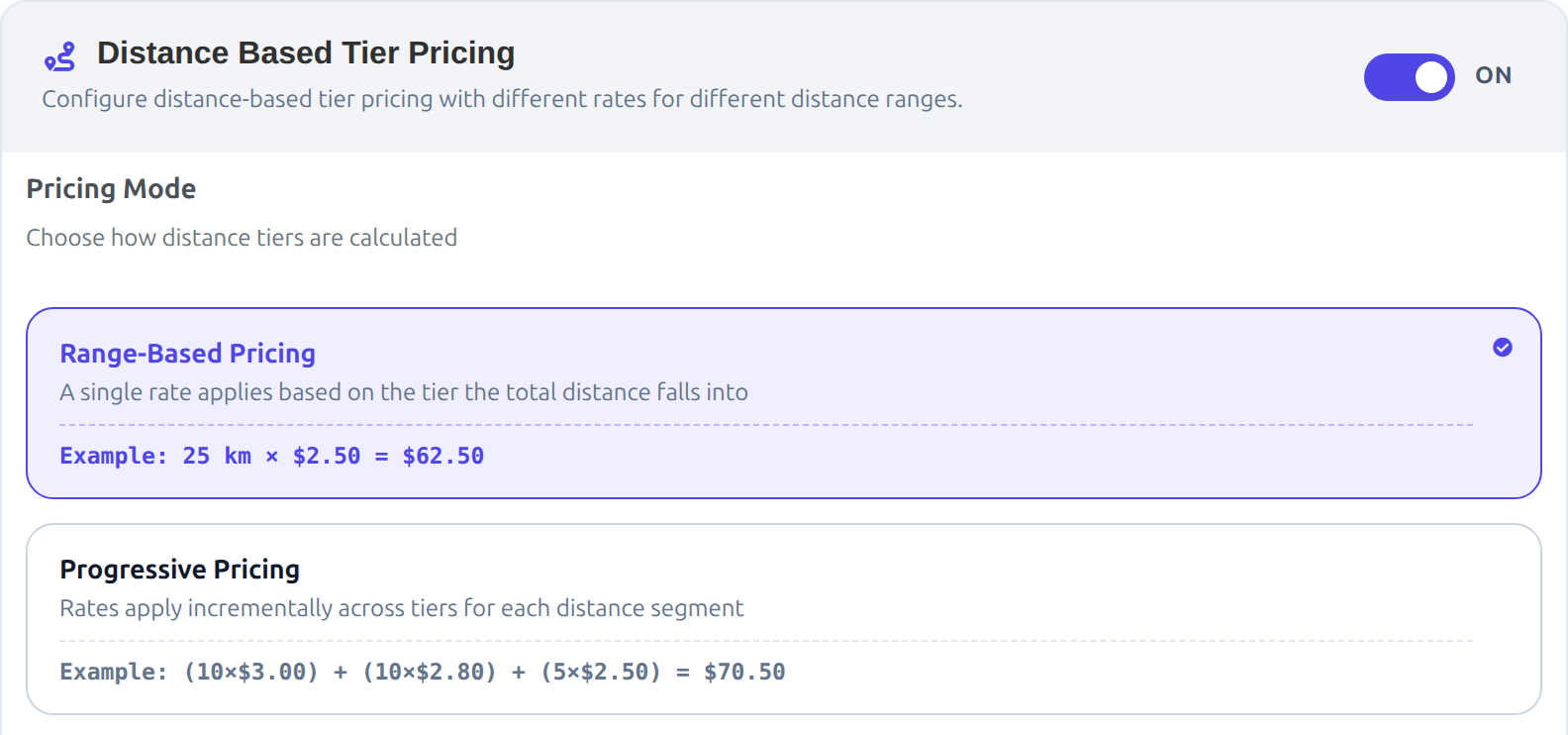
- Find Distance Based Tier Pricing and turn the switch ON.
- Choose a Pricing Mode (see below).
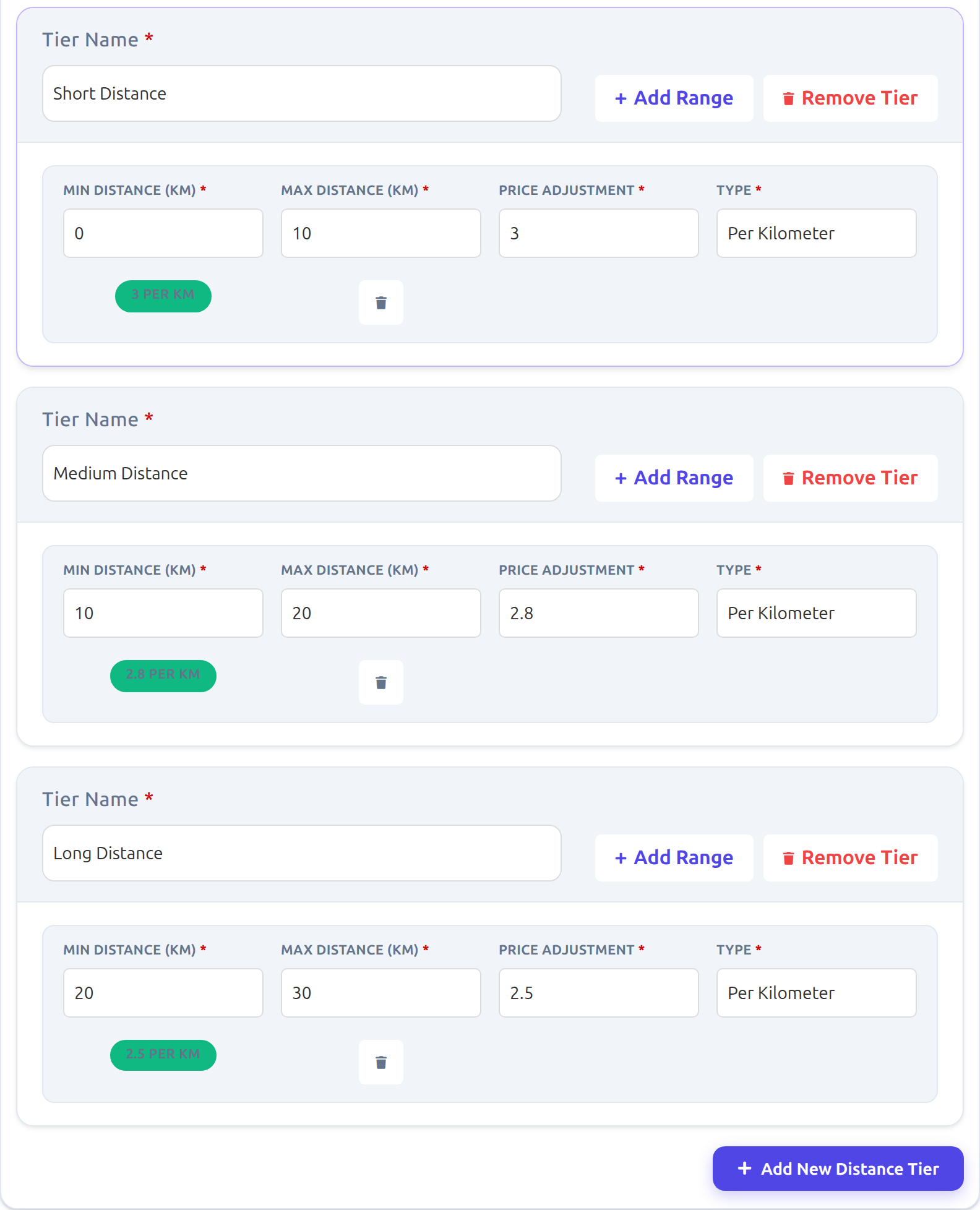
- Click Add New Distance Tier. Give the tier a name, then fill in its first range.
- Click Add Range inside a tier to add more ranges to it, or add more tiers.
- Click Update to save.
Fields
| Field | What it does |
|---|---|
| Tier Name | A label for the tier, for example “Short Distance”. Required. It also shows on the vehicle card. A tier without a name, or without at least one complete range, is not saved. |
| Min Distance and Max Distance | Where the range starts and ends. The unit follows Settings → Global Settings → Transportation Duration By Kilometer or Mile, and the labels say which one. |
| Price Adjustment | The price for each kilometer (or mile) in this range, for example 2.8. |
| Type | Always Per Kilometer (or Per Mile). |
| Add Range | Adds another range to the same tier. |
| Remove Tier / trash button | Removes the whole tier / one range. |
Pricing Modes
- Range-Based: the range the whole trip falls into sets one rate for every kilometer.
- Progressive: each part of the trip is charged at the rate of the range it falls into, like income tax bands.
Example with the tiers above (0–10 km at 3, 10–20 km at 2.8, 20–30 km at 2.5) and a vehicle that normally charges 2 per km:
| Trip | Normal price (2 per km) | Range-Based | Progressive |
|---|---|---|---|
| 5 km | 10 | 15 (5 × 3) | 15 (5 × 3) |
| 15 km | 30 | 42 (15 × 2.8) | 44 (10 × 3 + 5 × 2.8) |
| 25 km | 50 | 62.50 (25 × 2.5) | 70.50 (10 × 3 + 10 × 2.8 + 5 × 2.5) |
| 35 km | 70 | 87.50 (35 × 2.5) | 95.50 (10 × 3 + 10 × 2.8 + 15 × 2.5) |
Good to know
- A trip that ends exactly on a boundary (for example 10 km) belongs to the lower range.
- A trip longer than your last range is charged at the last range’s rate: for the whole trip in Range-Based mode, and for the extra distance in Progressive mode.
- If your first range does not start at 0, the distance before it is charged at the vehicle’s normal Price/KM.
- Tiers replace only the distance part of the price. The rest is added as usual: waiting time, initial price, and the hourly part of Distance + Duration pricing. The vehicle’s minimum price and the return trip multiplier are applied after that.
- If the vehicle has tiers switched off, or no complete tier, the normal price is used.
On the Booking Form
After a search, each vehicle card shows a small badge under the price with the tier the trip fell into, for example Medium Distance 10–20km @ 2.8/km. For a trip longer than the last range it shows Last 20+ km @ 2.5/km, and for a trip shorter than the first range it shows Base with the vehicle’s normal rate.
Purchase
This addon is available for purchase from the MagePeople website.