
MagePeople Yacht Booking System
Official User & Administrator Manual
Table of Contents
- Overview & System Requirements
- Installation & Getting Started
- Command Center (Dashboard Overview)
- Fleet Management (Yachts Roster)
- Vessel Configuration Wizard (Steps 1–4)
- Booking Management & Calendar Schedule
- Guest Rosters & Passenger Manifests
- Add-ons & Promotional Coupons
- Global System Settings
- Pro Features Extension
- Frontend Booking Workflow & Confirmation Voucher
- Administrator FAQ & Troubleshooting
1. Overview & System Requirements
The MagePeople Yacht Booking System is an enterprise-grade reservation and fleet operations plugin built for WordPress. It empowers luxury charter operators, boat hire businesses, and marina teams to list vessels, orchestrate calendar availability, process online deposits or offline payments, and streamline quayside guest check-ins.
Minimum Requirements
- WordPress: Version 5.8 or higher
- PHP: Version 7.4 or higher (PHP 8.1+ recommended)
- WooCommerce: Optional (only needed if routing transactions through WooCommerce checkout)
- Browser Support: Chrome, Safari, Edge, Firefox, and tablet-optimized quayside mobile browsers
2. Installation & Getting Started
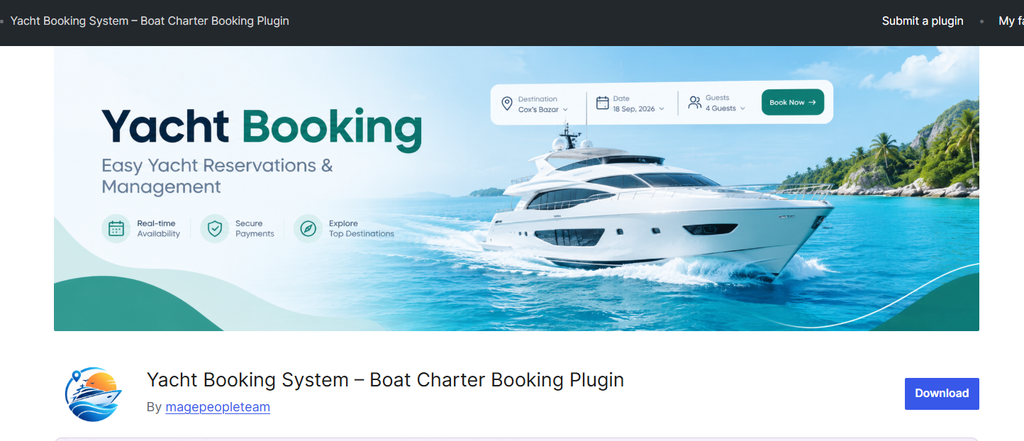
- Download the plugin archive file (magepeople-yacht-booking-system.zip).
- In your WordPress Admin sidebar, navigate to Plugins > Add New > Upload Plugin.
- Choose the ZIP file and click Install Now.
- Once uploaded, click Activate Plugin.
- A dedicated workspace titled Yacht Booking will immediately appear in your main WordPress admin menu.
3. Command Center (Dashboard Overview)
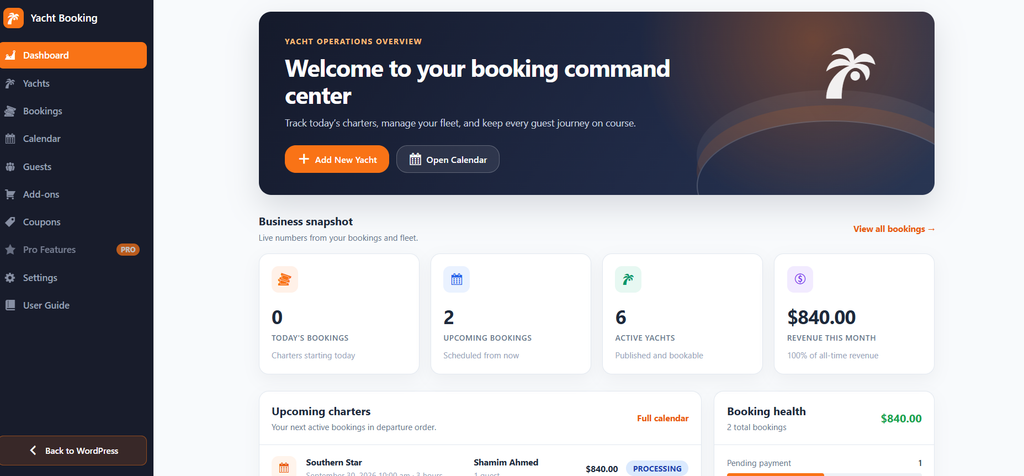
The administrative Dashboard provides an operational overview of charter operations and financial health.
- Header Controls: Instant trigger buttons to + Add New Yacht and Open Calendar.
- Business Snapshot Metrics:
- Today’s Bookings: Charters departing or active on the current calendar day.
- Upcoming Bookings: Future confirmed charters scheduled from tomorrow onward.
- Active Yachts: Total number of live, published, and bookable vessels across the fleet.
- Revenue This Month: Total gross revenue logged from confirmed and processing orders within the active calendar month.
- Upcoming Charters Board: A chronological departure roster indicating the vessel name, departure date, time window, duration, primary customer name, party size, total charter price, and real-time status.
- Booking Health Breakdown: Real-time visual progress bars tracking bookings across every order stage:
- Pending Payment
- Processing
- On Hold
- Completed
- Cancelled
- Pending Payment
- Quick Actions Panel: Direct links to Add a yacht, Manage bookings, Booking settings, and Open user guide.
4. Fleet Management (Yachts Roster)
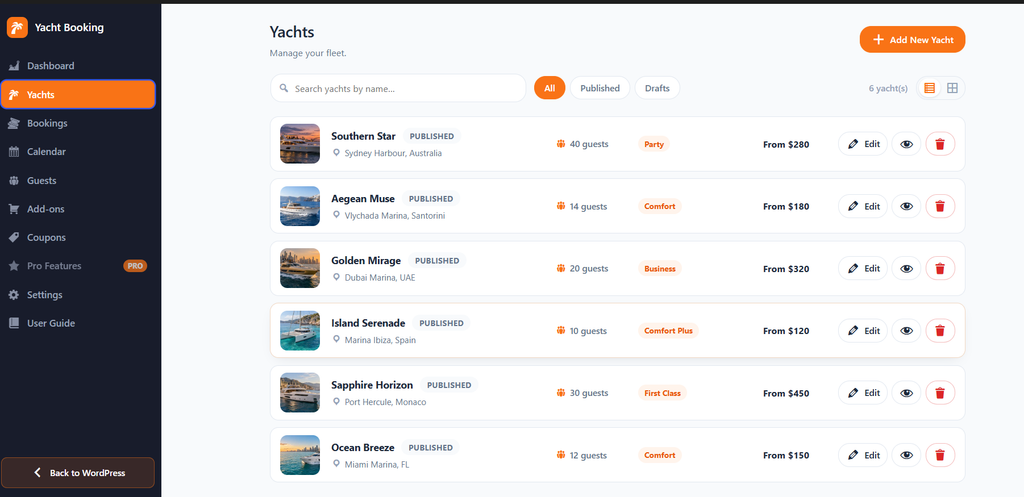
Under the Yachts menu, administrators have full control over the fleet catalog:
- Display Controls:
- View Modes: Toggle seamlessly between tabular List View and visual Grid View.
- Status Filters: Instant filters for All, Published, and Drafts.
- Fleet Search: Instant title search bar to locate specific boats.
- Vessel Card Attributes:
- Featured exterior vessel image.
- Yacht name, build year, and publication status (PUBLISHED or DRAFT).
- Home marina / pier tag.
- Maximum guest capacity badge.
- Experience / category pill (e.g., Party, Comfort, Business, First Class).
- Base starting price display (e.g., From $280).
- Action controls: Edit, Preview (eye icon), and Delete (trash icon).
5. Vessel Configuration Wizard
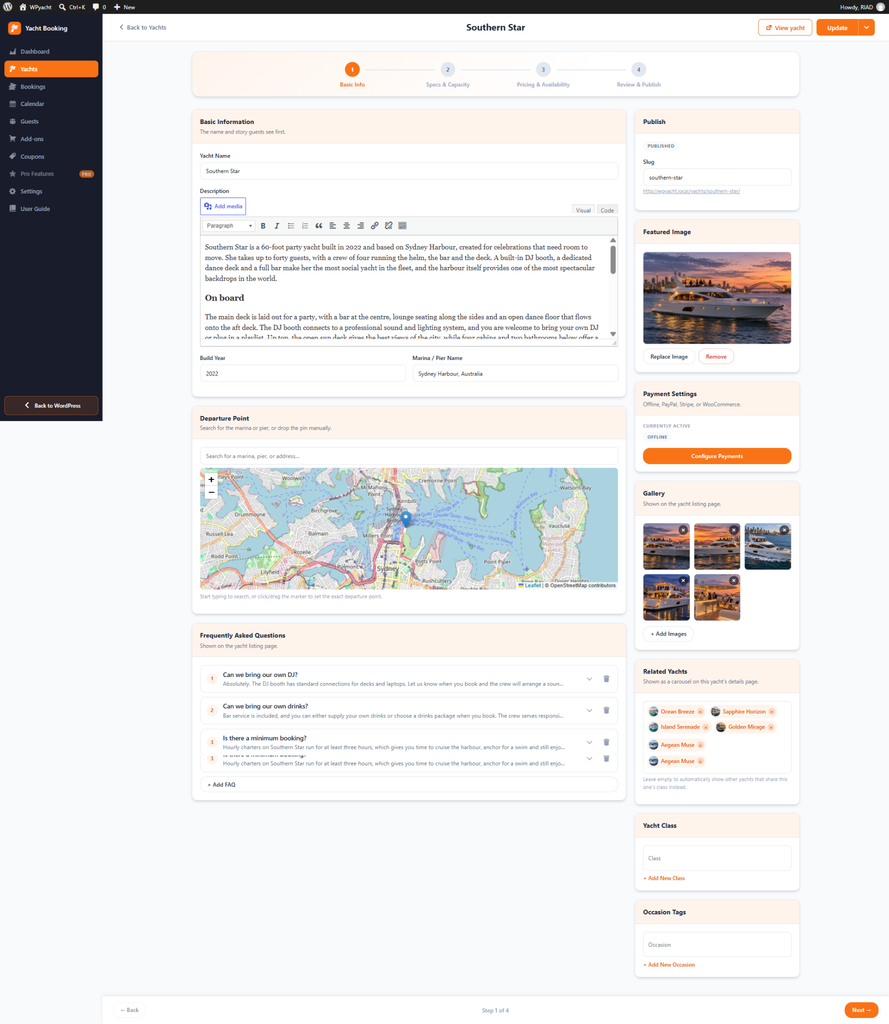
The plugin utilizes a 4-step wizard to configure every vessel:
Step 1: Basic Info
- Yacht Name: Vessel title as seen by guests across listings and vouchers.
- Description: Rich-text WYSIWYG editor for narrative copy, interior spaces, route options, and policies.
- Build Year: Year of manufacture/commissioning.
- Marina / Pier Name: Home port or embarkation dock text.
- Departure Point (Map Integration): Search for a dock address or manually click and drag a marker pin across an interactive map to store exact latitude/longitude embarkation coordinates.
- Frequently Asked Questions (FAQ): Accordion repeater allowing custom Q&A pairs (e.g., catering rules, BYO beverages, onboard DJ equipment).
- Sidebar Settings: Featured Image uploader, multi-image listing gallery, and cross-sell Related Yachts selector.
Step 2: Specs & Capacity
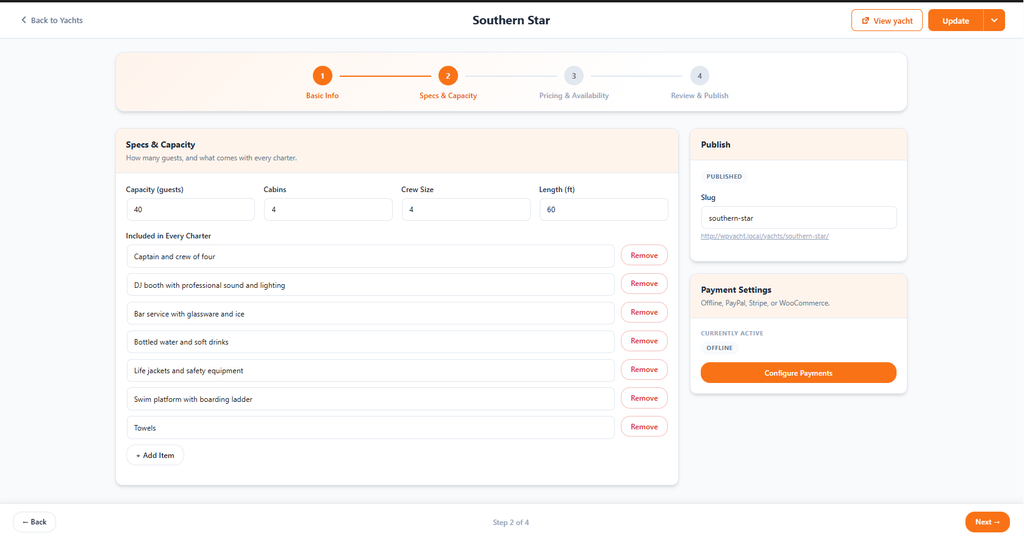
- Capacity (guests): Maximum passenger safety threshold permitted onboard.
- Cabins: Number of private staterooms or passenger cabins.
- Crew Size: Total captain and hospitality crew headcount onboard.
- Length (ft): Overall vessel length measured in feet.
- Included in Every Charter: Itemized repeater list for complimentary inclusions (e.g., Captain and crew of four, DJ sound system, Bar service with glassware and ice, Bottled water, Life jackets, Swim platform with ladder, Towels).
Step 3: Pricing & Availability
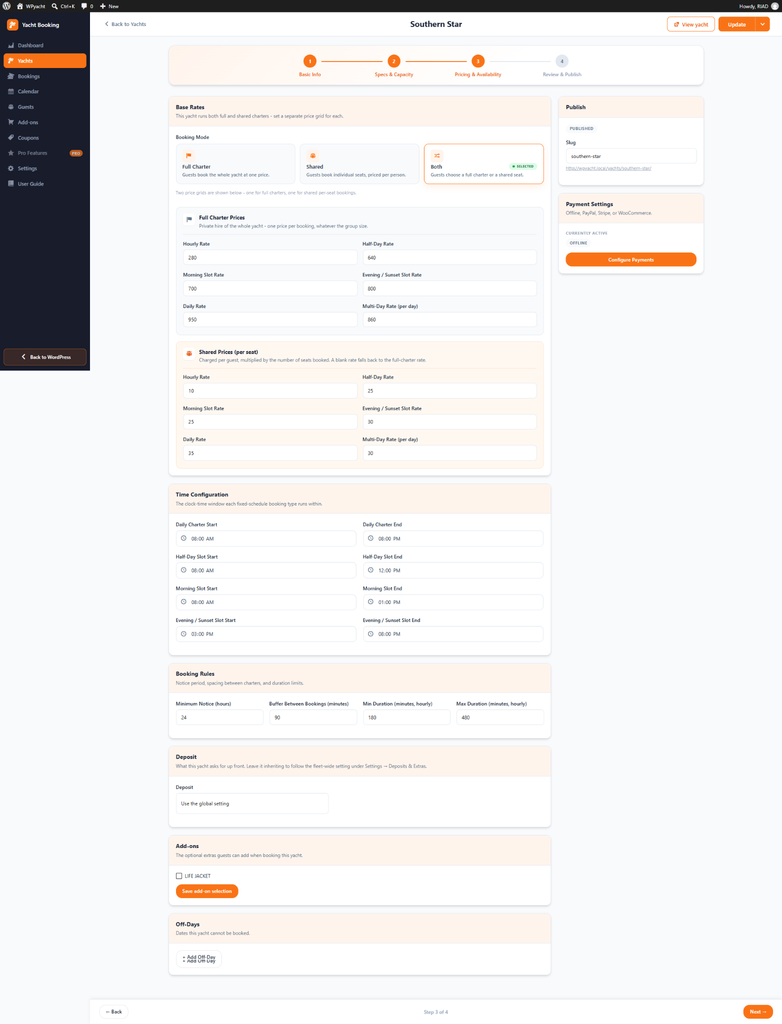
- Booking Mode:
- Full Charter: Guests reserve the private entire vessel at a single flat price.
- Shared: Guests book individual passenger tickets/seats.
- Both: Front-end guests choose whether to rent the whole yacht or select individual seats.
- Pricing Grids (Full Charter & Shared Per-Seat):
- Hourly Rate: Flexible per-hour rental cost.
- Half-Day Rate: Fixed flat rate for 4-hour rental blocks.
- Morning Slot Rate: Dedicated morning charter package price.
- Evening / Sunset Slot Rate: Dedicated premium sunset cruise rate.
- Daily Rate: Standard full-day 24-hour rate.
- Multi-Day Rate (per day): Discounted daily rate applied when reserving multiple days.
- Time Configuration: Start and end operating bounds for daily charters and fixed time slots (e.g., Daily: 08:00 AM – 08:00 PM; Half-Day: 08:00 AM – 12:00 PM; Morning: 08:00 AM – 01:00 PM; Sunset: 03:00 PM – 08:00 PM).
- Booking Rules:
- Minimum Notice (hours): Minimum lead time required prior to departure (e.g., 24 hours).
- Buffer Between Bookings (minutes): Mandatory turnaround/cleaning window between back-to-back charters (e.g., 90 minutes).
- Min Duration (minutes): Shortest permissible rental duration (e.g., 180 minutes / 3 hours).
- Max Duration (minutes): Longest permissible single-day hourly hire (e.g., 480 minutes / 8 hours).
- Vessel-Level Overrides:
- Deposit: Set a custom vessel deposit percentage or select “Use the global setting”.
- Add-ons: Check individual optional add-on extras available specifically for this boat.
- Off-Days: Define custom calendar blackout dates where this particular yacht is out of service.
Step 4: Review & Publish
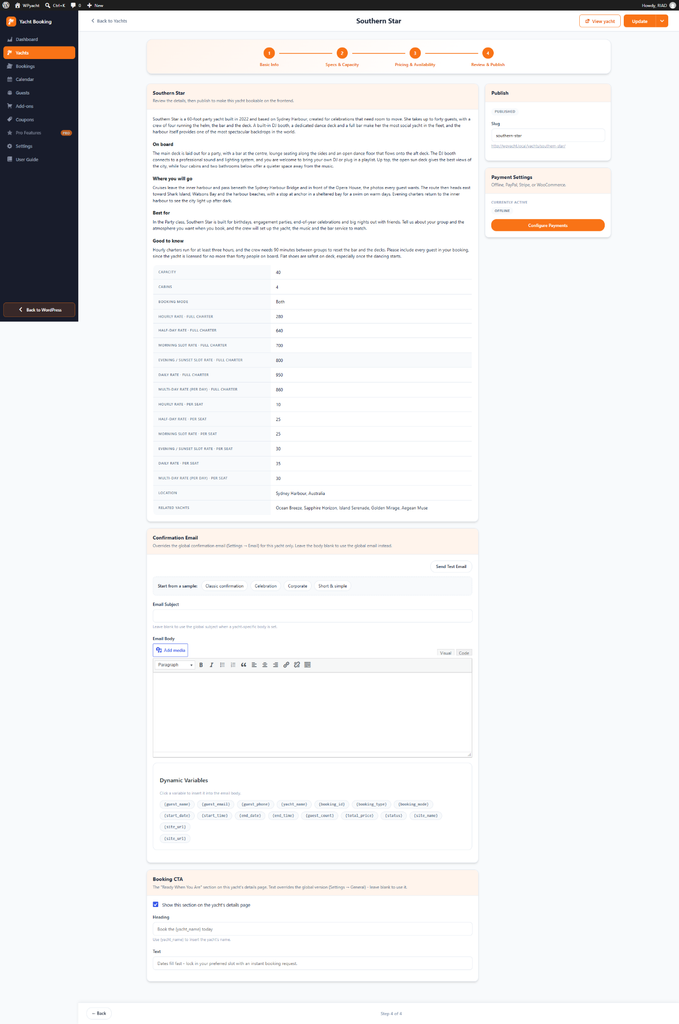
- Parameter Audit: Comprehensive checklist reviewing all specifications, booking modes, pricing tables, and embarkation details before going live.
- Confirmation Email Override: Yacht-specific email customization using template presets (Classic confirmation, Celebration, Corporate, Short & simple).
- Merge Tags: {guest_name}, {guest_email}, {guest_phone}, {yacht_name}, {booking_id}, {booking_type}, {booking_date}, {start_date}, {start_time}, {end_date}, {end_time}, {guest_count}, {total_price}, {status}, {site_name}, {site_url}.
- Booking CTA Override: Customize the conversion callout banner text at the bottom of the details page, supporting {yacht_name} dynamic tags.
6. Booking Management & Calendar Schedule
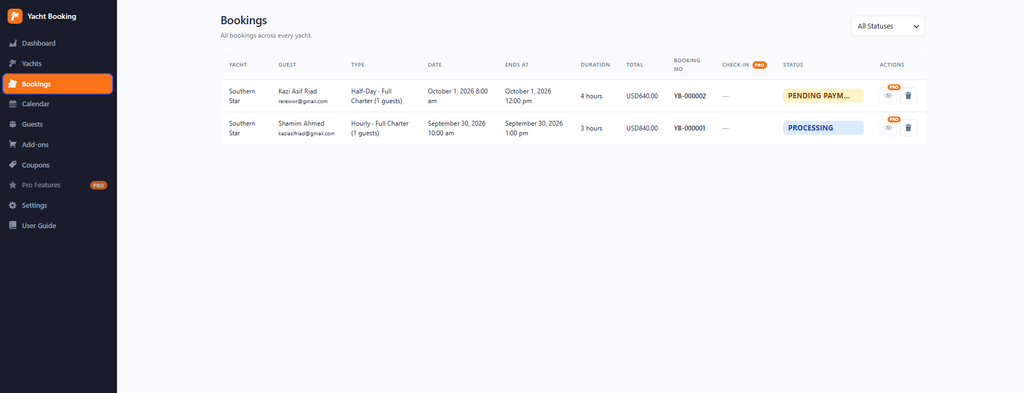
Bookings Manager
Under Yacht Booking > Bookings, view and manage all historical and upcoming customer reservations:
- Table Data: Unique reference (e.g., YB-000001), vessel name, customer name and email, charter format, departure date/time, end date/time, duration, grand total, check-in status, and payment status badge.
- Order Status Filter: Filter between Pending Payment, Processing, On Hold, Completed, and Cancelled.
- Actions: View full reservation breakdown or remove cancelled records.
Visual Availability Calendar
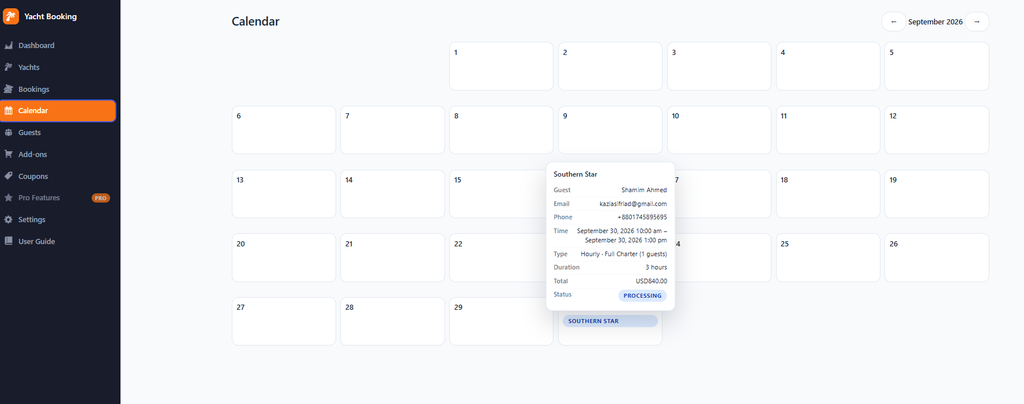
Under Yacht Booking > Calendar, view charter density on an interactive monthly grid:
- Navigate months with the previous (←) and next (→) controls.
- Scheduled departures appear as color-coded reservation pills on the calendar days.
- Interactive Hover/Click Popover: Instantly inspect guest details, email, contact telephone, yacht name, scheduled hours, grand total, and current status without leaving the calendar view.
7. Guest Rosters & Passenger Manifests
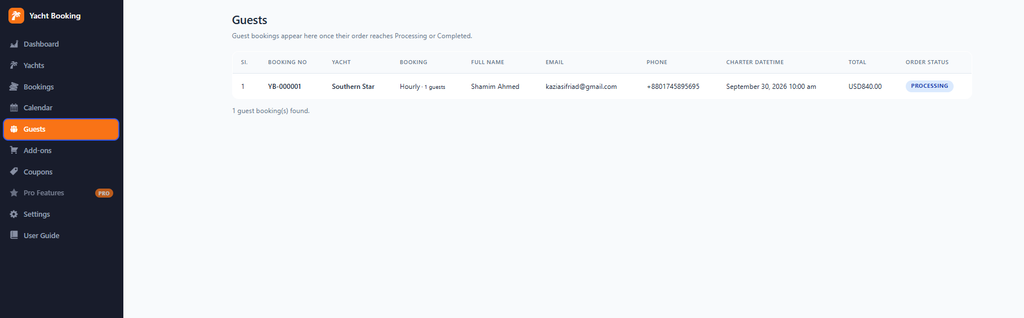
Under Yacht Booking > Guests, access the real-time passenger manifest designed for marina managers and boarding crew:
- Reservations automatically populate this roster once orders transition to Processing or Completed.
- Displays passenger sequence index, booking reference code, chartered vessel, charter type/guest headcount, guest full name, email address, phone number, departure date/time, total price, and status.
8. Add-ons & Promotional Coupons
Add-ons (Extras)
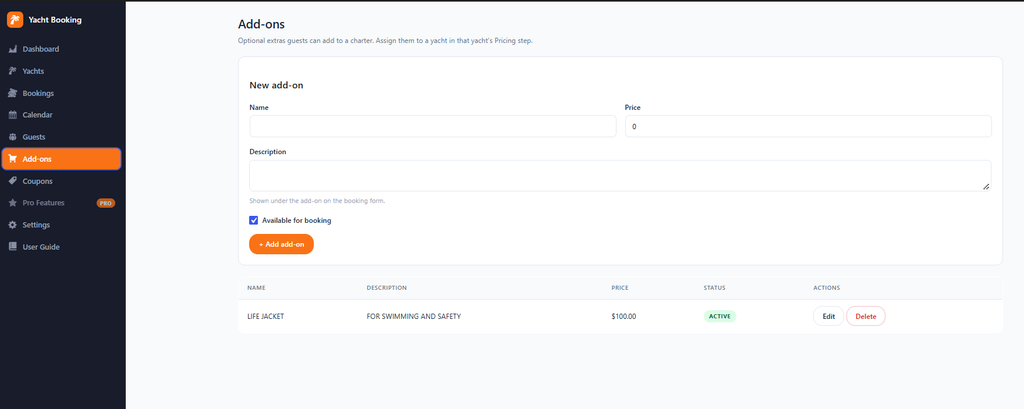
Manage rental extras, catering tiers, and watersports equipment under Yacht Booking > Add-ons:
- Configure Add-on Title, Price, Description, and Active/Inactive visibility toggle.
- Once saved, attach add-ons fleet-wide or bind them selectively to individual boats in Step 3 of the yacht wizard.
Coupons (Promotions)
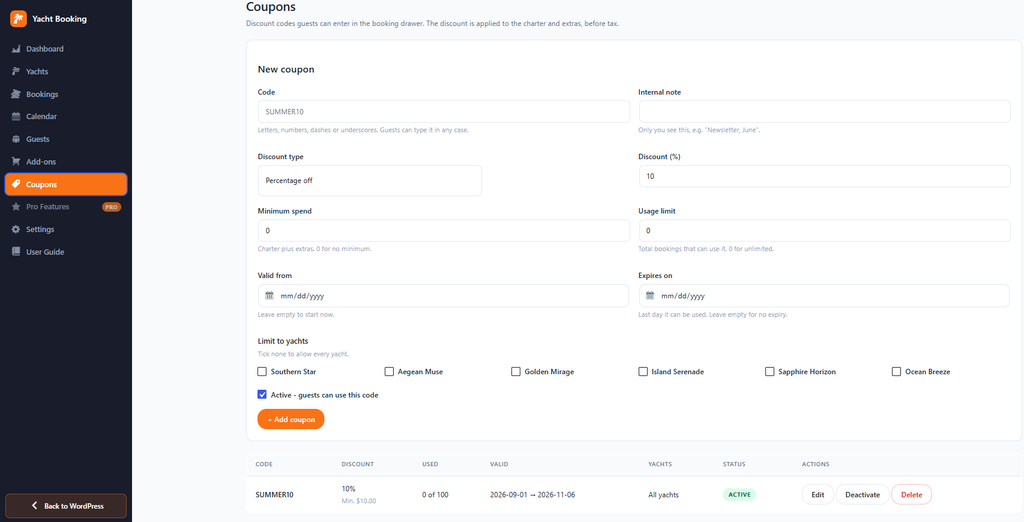
Create discount promotions under Yacht Booking > Coupons:
- Code: Custom alphanumeric coupon string (case-insensitive for guests).
- Internal Note: Reference notes for accounting/campaign tracking.
- Discount Type & Amount: Set percentage discount rates (e.g., 10%).
- Restrictions & Usage Limits: Minimum cart spend requirements, maximum total redemption counts, and active date validity windows.
- Vessel Restrictions: Restrict coupon validity to specific yachts or leave unchecked to allow fleet-wide application.
9. Global System Settings
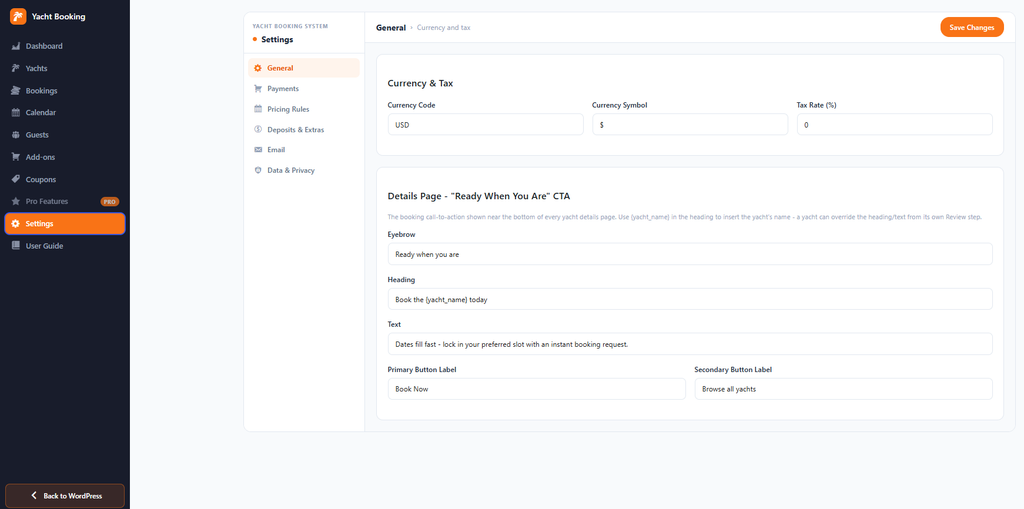
Navigate to Yacht Booking > Settings to manage system-wide settings across 6 core tabs:
| Tab | Primary Configuration Options |
| General | Set global Currency Code (e.g., USD), Currency Symbol (e.g., $), and Tax Rate (%). Customize default front-end “Ready When You Are” bottom CTA banner text and button labels. |
| Payments | Choose payment flow architecture: Custom Payment Methods (standalone Offline/Manual, PayPal, Stripe) or WooCommerce Checkout. |
| Pricing Rules | Set global off-days and seasonal surcharges. Filter by date range, days of the week, and type (Off-day/block booking, Weekday/weekend, Seasonal). Vessel-specific rules always override global rules. |
| Deposits & Extras | Enable split deposit payments (percentage of total charged upfront, balance due later) and global add-on form visibility toggles. |
| Configure admin alerts for new reservations, outgoing sender identity (From Name & Email), test email dispatch, and triggers for guest confirmation emails (Pending Payment, Processing, On Hold, Completed). | |
| Data & Privacy | GDPR-compliant retention settings to anonymize guest data after specified months (0 to disable), plus a toggle to remove all plugin data upon uninstallation. |
10. Pro Features Extension
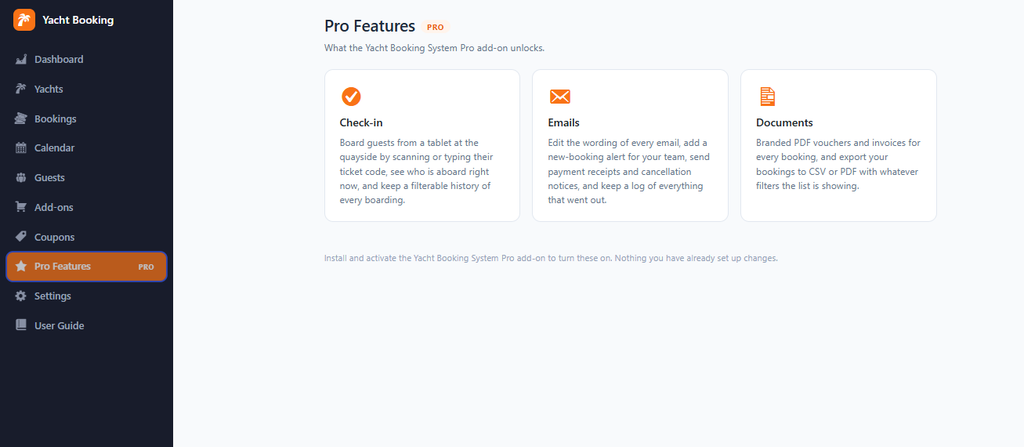
Activating the Yacht Booking System Pro add-on unlocks dedicated operational modules:
- Quayside Check-in: Digital boarding interface designed for mobile tablets quayside. Scan or enter ticket codes, track real-time boarding rosters, and maintain a filterable boarding log.
- Advanced Email Customization: Edit wording for every email notification, send payment receipts and cancellation notices, alert crew members to new bookings, and maintain complete outgoing email logs.
- Documents & Reporting: Generate branded PDF booking vouchers and tax invoices. Export filtered booking lists and manifests directly to CSV or PDF.
11. Frontend Booking Workflow & Confirmation Voucher
The front-end user experience provides an intuitive checkout flow:
[ Yacht Listing Page ]
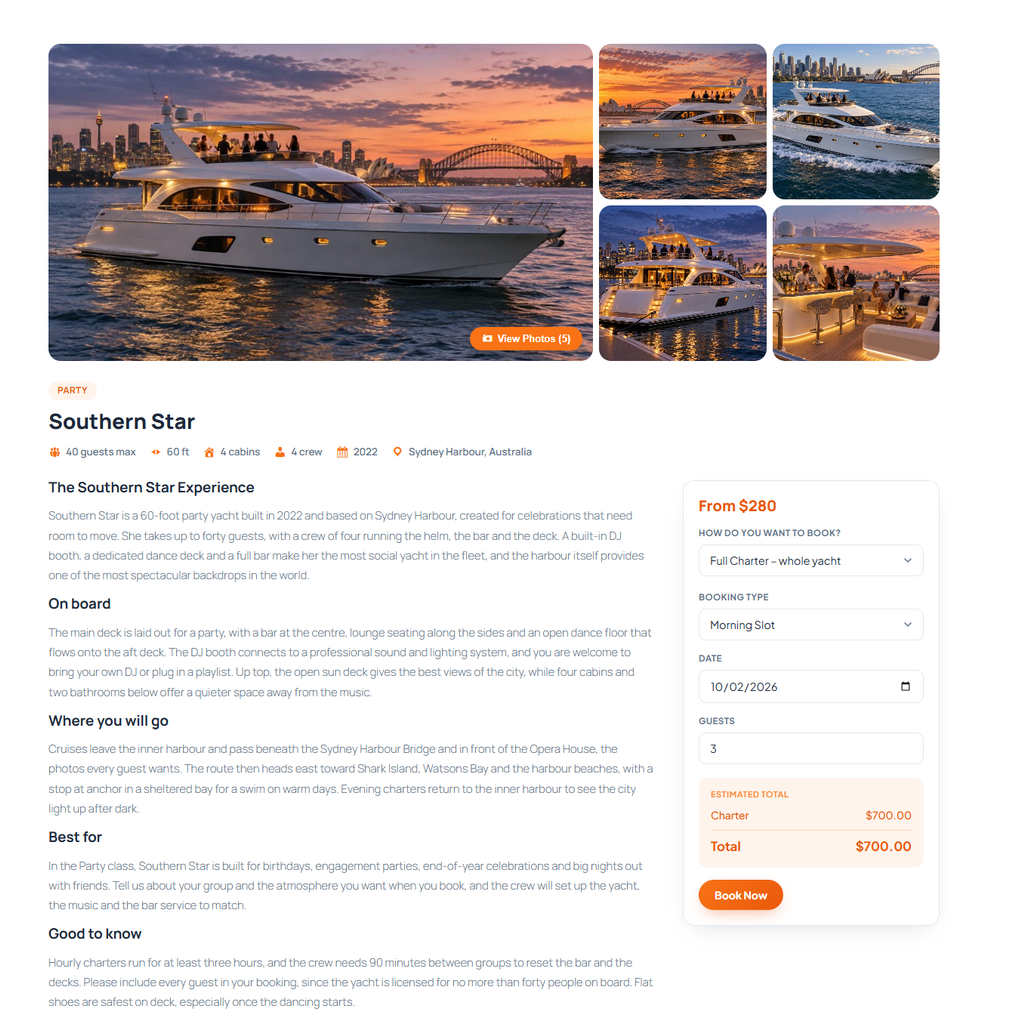
│ Select Date, Mode (Full/Shared), Time Slot & Guests
▼
[ Drawer Step 1: Summary ]
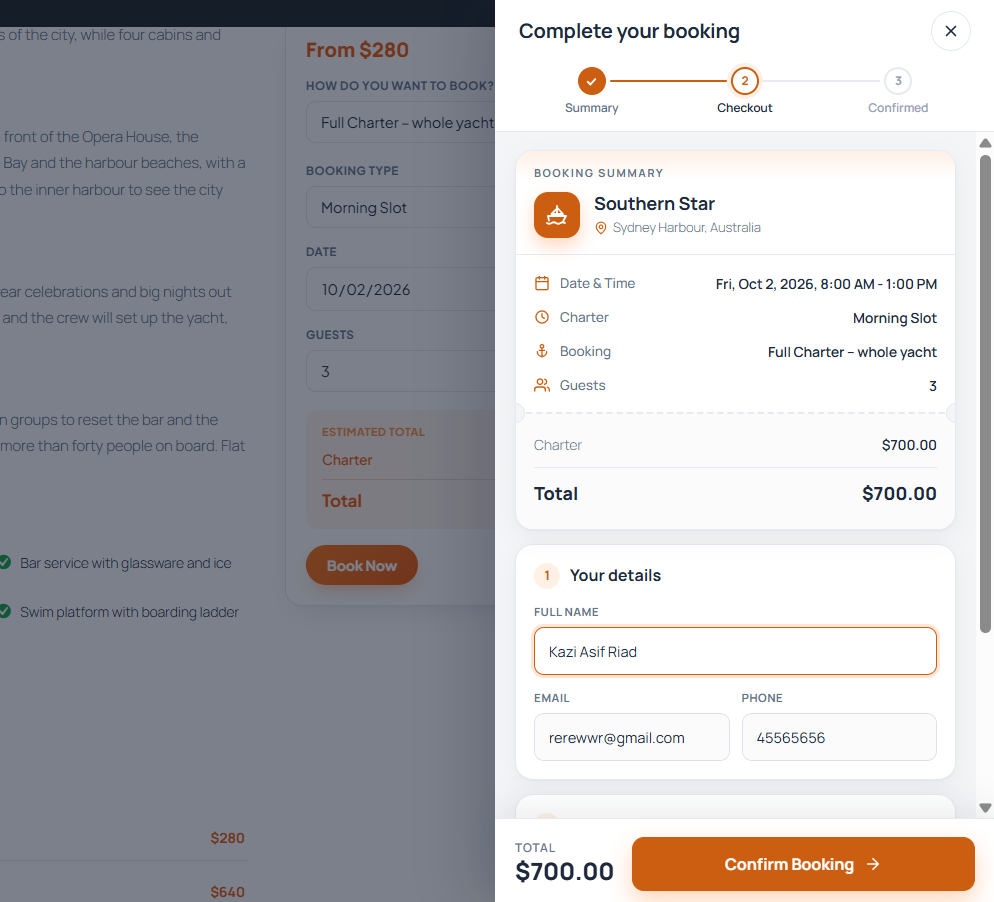
│ Inspect Schedule, Location & Price Calculation
▼
[ Drawer Step 2: Checkout ]
│ Enter Contact Info, Apply Coupons & Select Payment
▼
[ Drawer Step 3: Confirmed (“You’re all set!”) ]
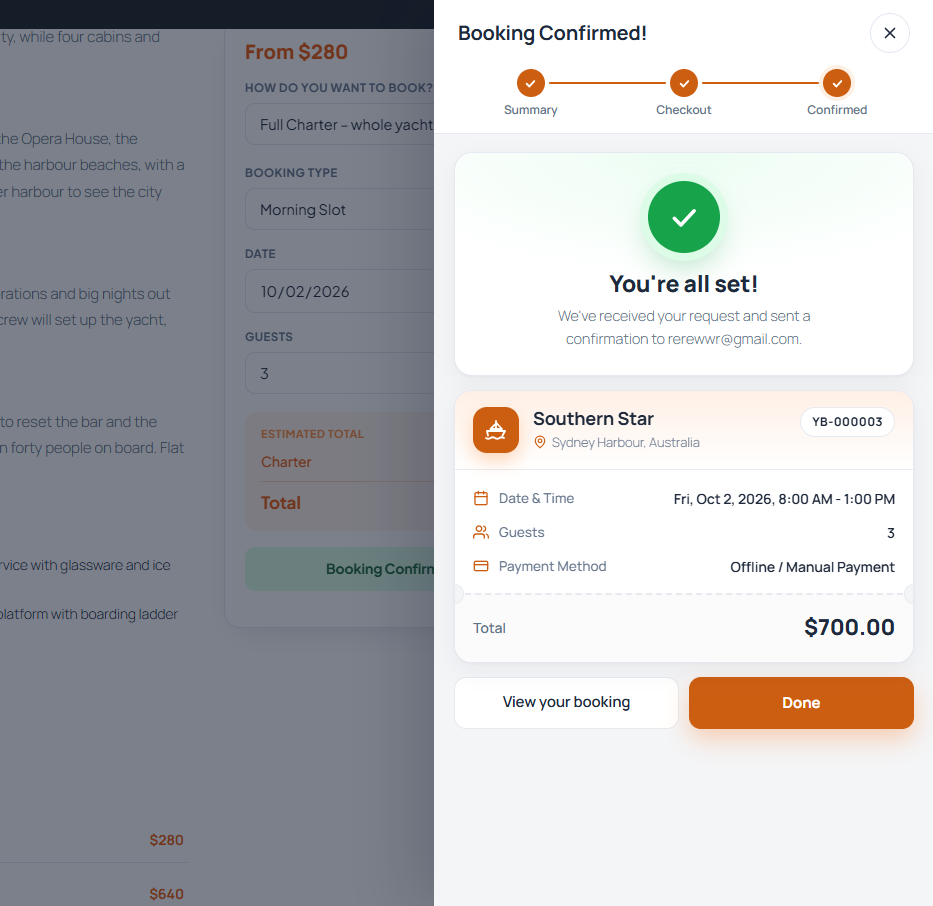
│ Review Reference Code (e.g., YB-000002)
▼
[ Public Booking Confirmation Page ]
• Booking Reference & Current Order Status (Pending/Processing)
• Charter Schedule Window (Start/End Times)
• Total Price, Amount Paid & Remaining Balance Due
• Quayside Check-In Code Hash (for crew verification upon boarding)
12. Administrator FAQ & Troubleshooting
Q: Can I run this system without WooCommerce installed?
A: Yes. Under Settings > Payments, select Custom Payment Methods. This activates built-in checkout support for Offline/Manual payments, PayPal, and Stripe without requiring WooCommerce.
Q: How does the system handle pricing rule conflicts?
A: When multiple rules match the same calendar date, a rule set for a specific single yacht always beats a fleet-wide rule, followed by the rule with higher priority.
Q: How do partial deposits work during checkout?
A: When enabled under Settings > Deposits & Extras, the checkout gateway charges only the specified deposit percentage. The system records the full charter total in the database, while both the email receipt and the web confirmation page clearly itemize the Paid so far and Balance due amounts.