Settings
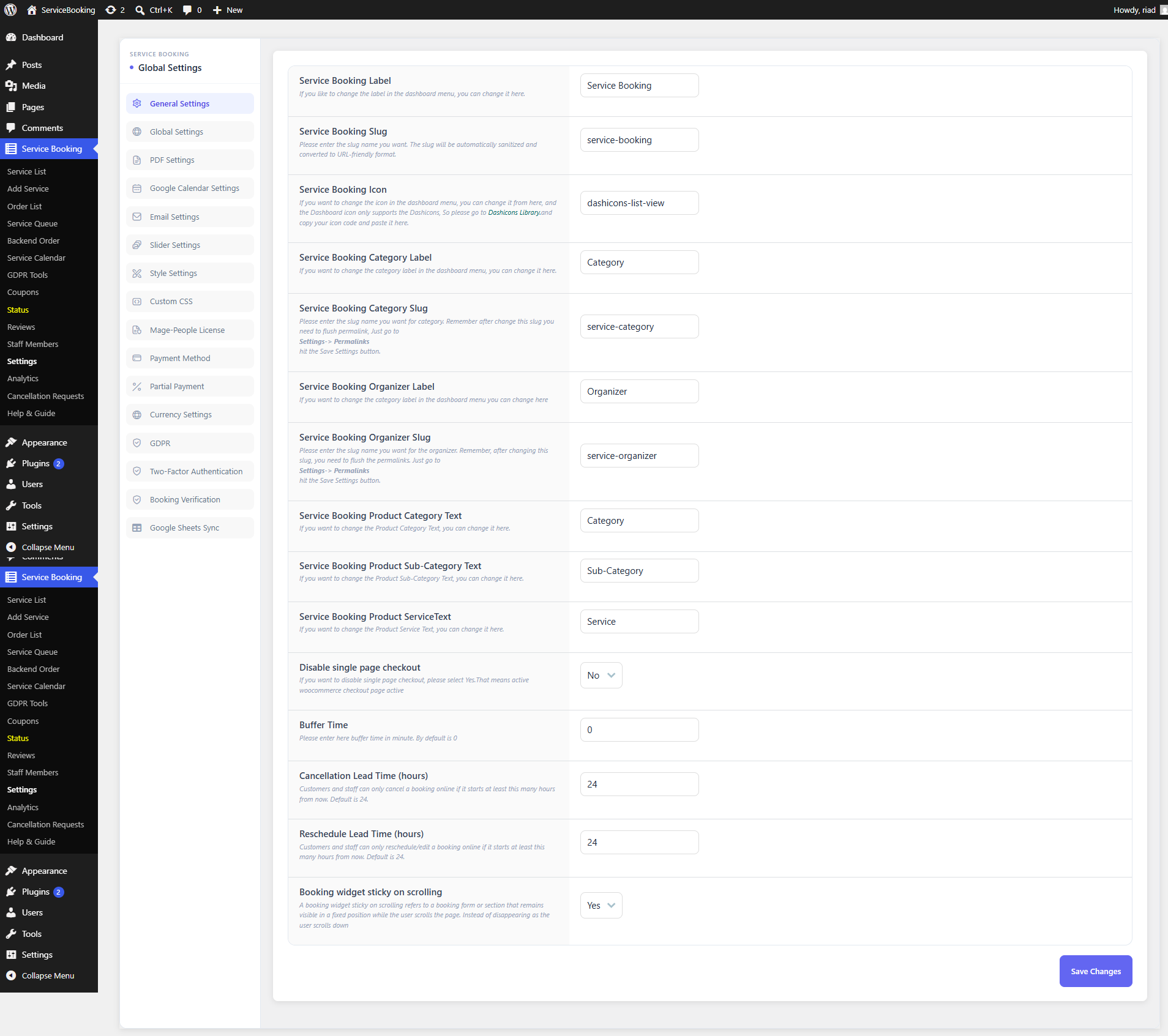
Settings Navigation
The left-hand sidebar groups all plugin-wide configuration into dedicated tabs:
- General Settings — core plugin options, labels, URL slugs, and buffer/lead-time rules (see below)
- Global Settings — system-wide fallback options and defaults
- PDF Settings — booking vouchers, invoices, and downloadable PDF tickets
- Google Calendar Settings — synchronization controls for external Google Calendars
- Email Settings — automated email notification templates and sender details
- Slider Settings — showcase slider configuration for front-end service galleries
- Style Settings & Custom CSS — visual styling, color schemes, and custom CSS overrides
- Mage-People License — plugin activation, license management, and automatic updates
- Payment Method & Partial Payment — payment gateway routing, deposit management, and installment options — see Payment Integration
- Currency Settings — currency symbols, position rules, and decimal formatting
- GDPR, 2FA & Verification — compliance tools, two-factor authentication, and ticket verification controls
- Google Sheets Sync — rules for syncing bookings directly to Google Sheets
General Settings
| Setting Field | Description | Default / Example |
|---|---|---|
| Service Booking Label | Customizes the main admin menu label visible in the WordPress sidebar. | Service Booking |
| Service Booking Slug | Sets the URL permalink slug for primary service pages. (Note: Permalinks must be flushed after changing.) | service-booking |
| Service Booking Icon | Defines the WordPress Dashicon class used for the admin menu icon. | dashicons-list-view |
| Service Booking Category Label & Slug | Customizes the label and URL permalink slug for service categories. | Category / service-category |
| Service Booking Organizer Label & Slug | Customizes the label and URL permalink slug for event/service organizers. | Organizer / service-organizer |
| Product Category / Sub-Category / Service Text | Customizes front-end text labels used across product pages and booking widgets. | Category, Sub-Category, Service |
| Disable Single Page Checkout | Choose whether to bypass single-page modal checkout in favor of standard WooCommerce checkout pages. | No |
| Buffer Time | Sets mandatory buffer padding (in minutes) between consecutive appointment slots. | 0 |
| Cancellation Lead Time (hours) | Specifies minimum advance notice (in hours) required for customers to cancel bookings online. | 24 |
| Reschedule Lead Time (hours) | Specifies minimum advance notice (in hours) required for customers to reschedule appointments online. | 24 |
| Booking Widget Sticky on Scrolling | Enables or disables the sticky behavior of the front-end booking card as users scroll down. | Yes |
Click Save Changes to persist all updated labels, slugs, and lead time rules.