Analytics, Status & Privacy
Analytics Dashboard
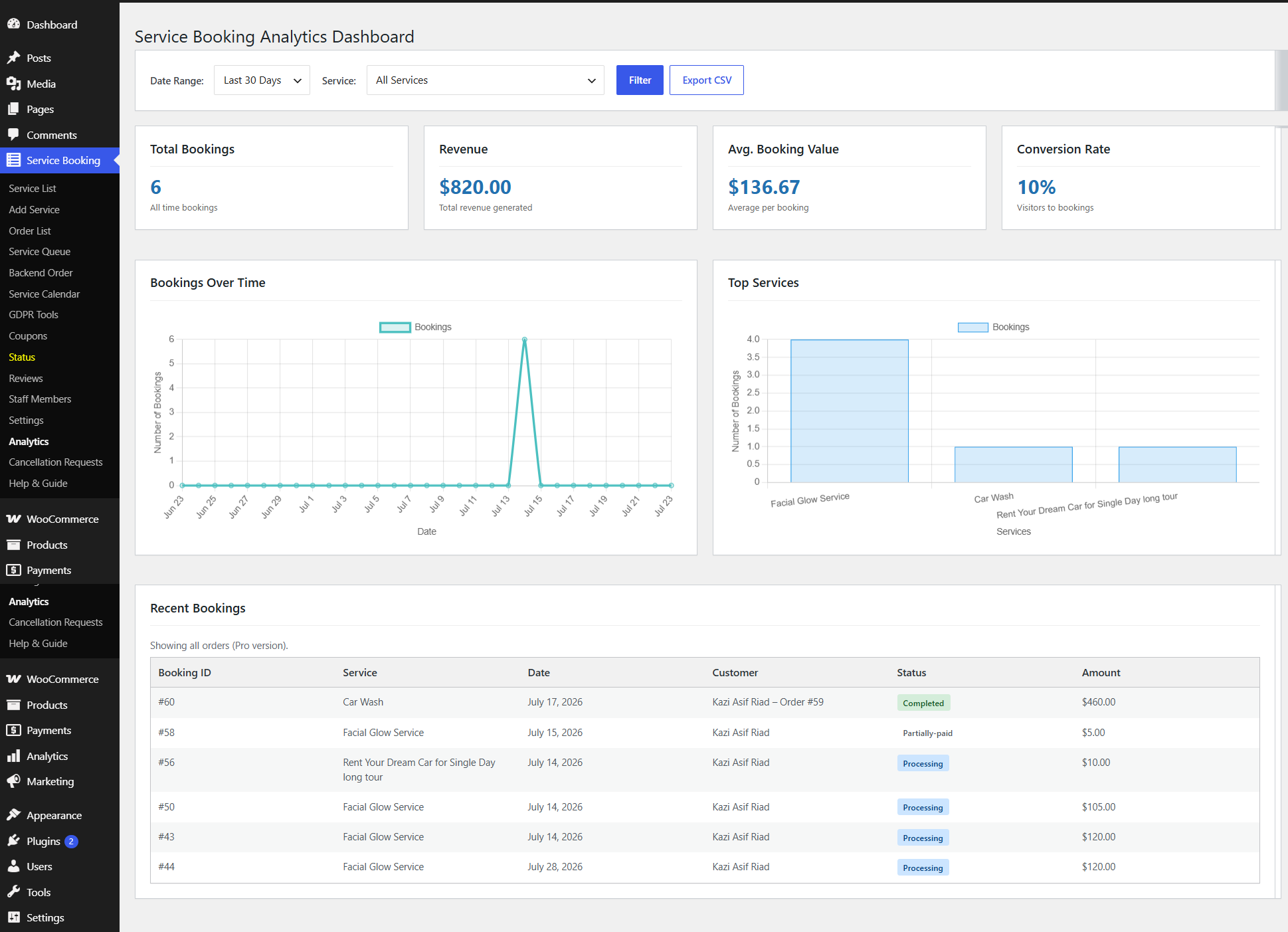
Detailed reporting and business intelligence tools to track revenue, evaluate booking trends, analyse popular services, and monitor conversion metrics.
Filters & Data Controls
- Date Range — Last 30 Days, Last 7 Days, This Month, or a custom range
- Service Selector — All Services or a specific service offering
- Filter — apply the selected date range and service to refresh all charts
- Export CSV — export reporting metrics for external auditing or accounting
KPI Cards
- Total Bookings — overall completed booking volume for the selected timeframe
- Revenue — total gross revenue from bookings
- Avg. Booking Value — average revenue per completed booking
- Conversion Rate — visitor-to-booking performance
Charts
- Bookings Over Time — line graph of daily reservation volume to spot peak booking days
- Top Services — bar graph ranking top-performing services by booking volume
Recent Bookings Stream
| Column | Description |
|---|---|
| Booking ID | Unique order identifier link |
| Service | Reserved service title |
| Date | Scheduled date for service execution |
| Customer | Name of the customer placing the reservation |
| Status | Completed, Partially-paid, Processing |
| Amount | Total revenue recorded |
System Status & Diagnostics
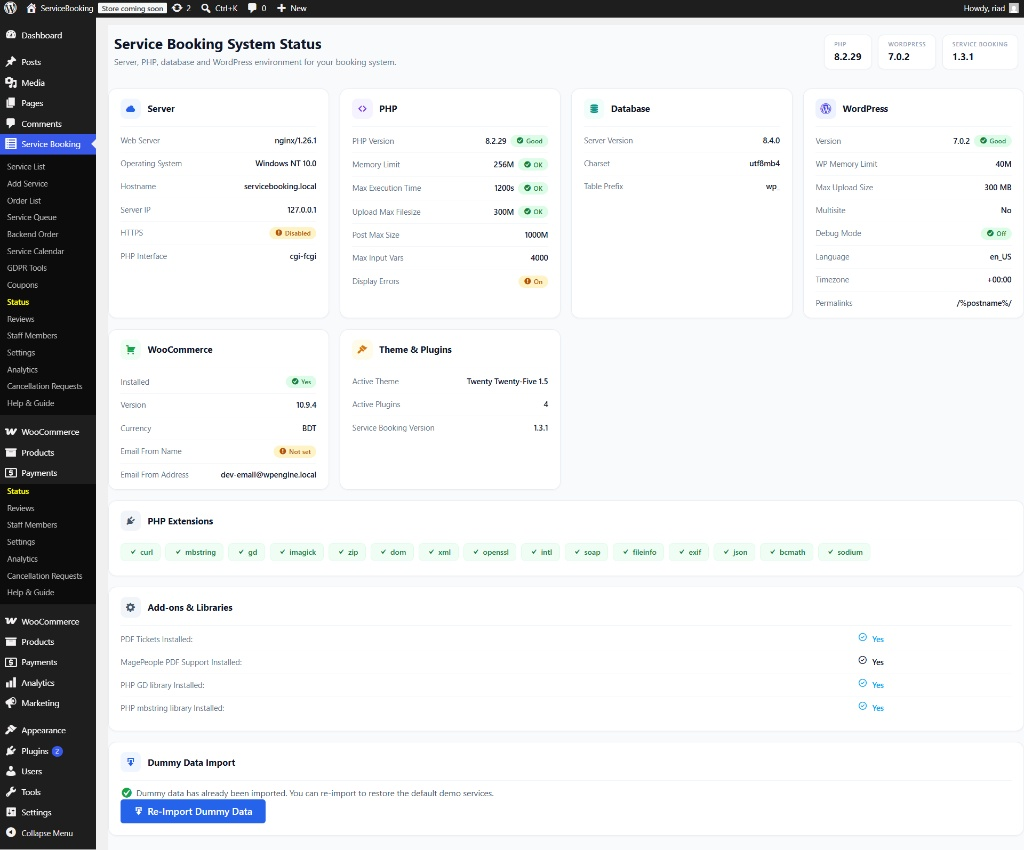
Overview of the server, database, PHP configuration, and WordPress environment — useful for diagnosing issues and verifying system requirements.
Quick Info Badges
- PHP Version, WordPress Version, and Service Booking Version
Core Environment Cards
- Server — web server software, OS, hostname, IP, HTTPS status, PHP interface
- PHP — memory limit, max execution time, upload/post max size, max input vars, display errors
- Database — server version, charset, table prefix
- WordPress — memory limit, max upload size, multisite status, debug mode, language, timezone, permalink structure
- WooCommerce — installation status, core version, currency, sender email
- Theme & Plugins — active theme, active plugin count, version tracking
Required PHP Extensions
Checklist confirming curl, mbstring, gd, imagick, zip, dom, xml, openssl, intl, soap, fileinfo, exif, json, bcmath, and sodium are enabled.
Add-ons & Libraries
- PDF Tickets installed
- MagePeople PDF Support installed
- PHP GD & mbstring libraries installed
Dummy Data Import
- Status indicator showing whether demo content has been imported
- Re-Import Dummy Data button to restore default demo services and schedules for testing
GDPR Tools & Privacy Management
Built-in tools to fulfil General Data Protection Regulation (GDPR) requirements and user privacy requests directly from the WordPress backend.
Quick Data Action Cards
Enter a customer's email to process manual requests:
- Export Customer Data — exports booking history and personal details as structured JSON, for data portability requests
- Anonymize Customer Data — replaces PII (name, email, phone) with placeholder values while keeping booking records intact for reporting
- Delete Customer Data (Right to Erasure) — permanently deletes all customer records and bookings; this action is irreversible
Customer Data Requests Queue
- Requests submitted by registered users from their front-end account dashboard queue here for admin review and approval
- Request Table — Customer, Requested (timestamp), Strategy/Options (export, anonymize, or delete), Status & Action
Compliance Features
- Self-Service Portability — customers request data copies from their account dashboard
- Data Anonymization — strips PII while keeping historical revenue analytics clean
- Audit Logging — every export, anonymization, and deletion event is logged
- Right to Erasure — complete, permanent deletion of matching customer records